

Sweetyspin Login
To complete a Sweetyspin login, open the casino site, select Log in in the top-right corner, and enter the email address and password you set at registration. The same credentials work across the browser site and the mobile app, and once you are in they open your AUD cashier, active bonuses, the full pokies and live-casino lobby, and the sportsbook - all under one account. There is no separate username: sign-in is email-based, a Forgot password? link handles resets by email, and no additional account is needed for the app. If the dashboard does not load after signing in, it is almost always a browser-cache or credentials issue rather than a problem with the account itself.
Here we explain how to log in to Sweety spin on desktop and mobile, how to recover a forgotten password, how to keep an account secure, and what happens with verification (KYC) - plus quick fixes for the most common sign-in problems.
Table of contents
| Login essentials | Details |
|---|---|
| Where to log in | Sweetyspin site (top-right Log in) or the mobile app |
| Login method | Registered email + password |
| Password reset | Via the "Forgot password?" email link |
| Device support | Desktop, mobile browser and app share one login |
| Verification | KYC requested before the first withdrawal |
| Currency | AUD |
| Support | 24/7 live chat and email |
How to log in to Sweetyspin
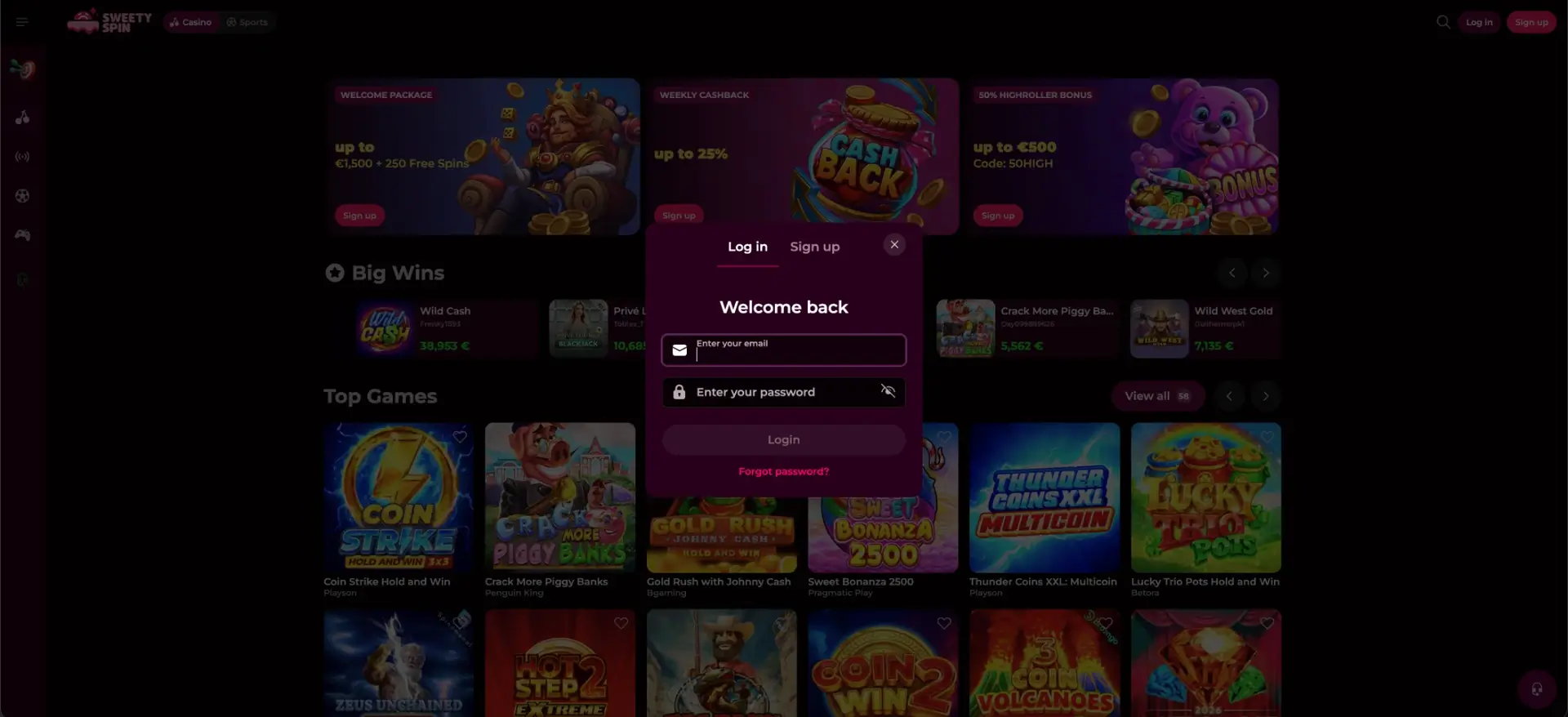
Signing in takes only a few seconds once your account exists. The login panel is reached from the same button in the top-right of every page, and it accepts the email and password from registration. Follow these steps for a Sweetyspin login:
You can open the corresponding section from our main navigation to view the current options and conditions.
Step-by-step sign in
The whole process runs from the login panel and takes seconds once your details are entered correctly:
- Open the Sweetyspin website in your browser, or launch the mobile app.
- Select Log in in the top-right corner of the page.
- Enter the email address you registered with.
- Type your password - the field is case-sensitive, and you can tap the eye icon to check it.
- Select Login and wait for the dashboard to load without refreshing the page.
If you don't have an account yet
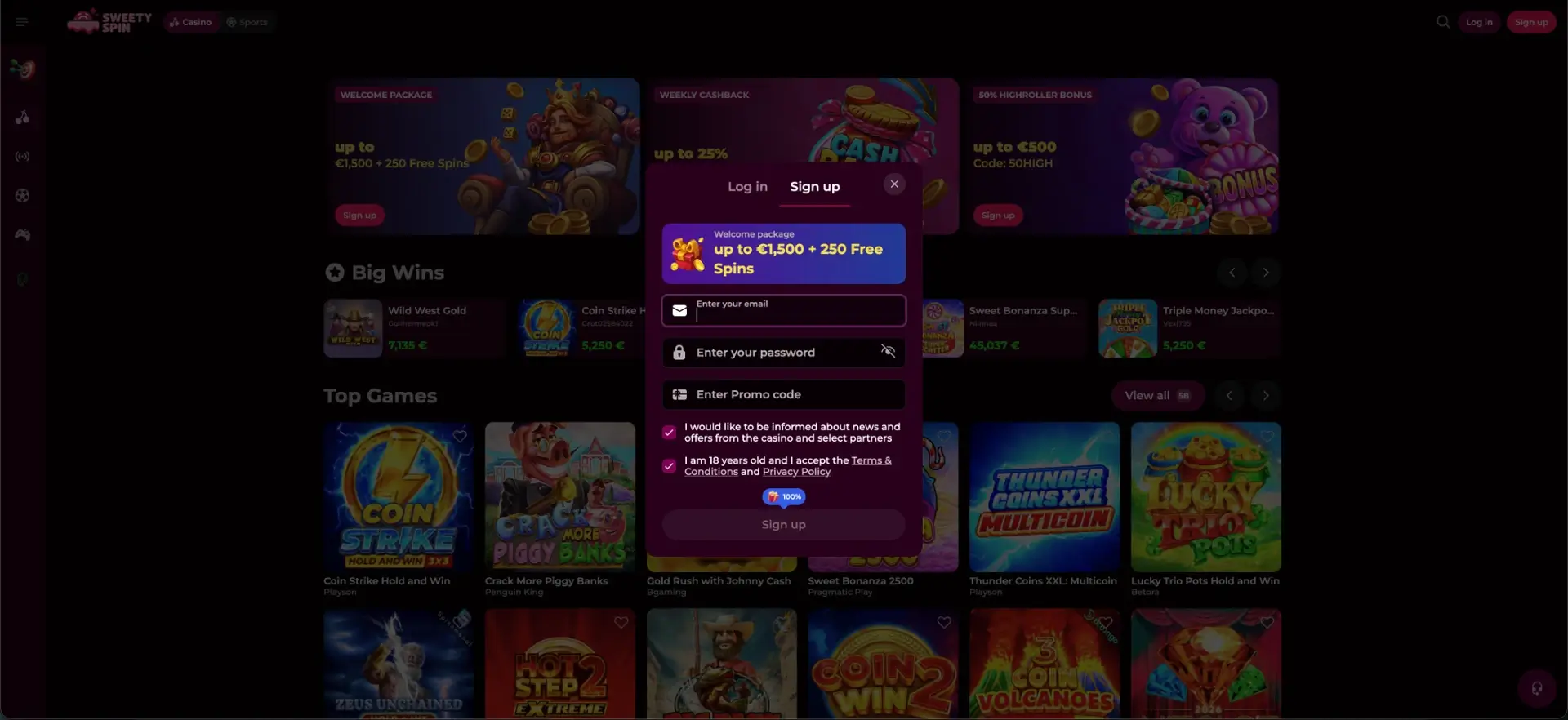
Anyone without a profile can create one in about a minute before logging in for the first time. Registration is email-based and adds an optional field for a promo code. To open an account:
Quick registration
Opening an account is a short, email-based form that leads straight into your first login:
- Select Sign up from the top-right of the site.
- Enter a valid email and a secure password.
- Add a promo code only if you have a specific one; leave it blank to keep the standard welcome package.
- Confirm you are 18 or over and accept the Terms & Conditions and Privacy Policy.
- Submit the form, then use your new email and password to log in.
Password recovery
A forgotten password does not lock you out - the casino resets it by email in a couple of steps. Use the recovery link on the login panel rather than creating a second account, which would split your history and bonuses. To reset a Sweety spin password:
Reset steps
The reset runs by email and only takes a moment, after which you can sign in with the new password:
- Open the login panel and select Forgot password?
- Enter the email address linked to your account.
- Open the reset email and follow the secure link it contains.
- Set a new, strong password and confirm it.
- Return to the login panel and sign in with the new password.
Secure login practices
A gambling account holds real money, so a few simple habits keep it protected. Most account problems come from weak passwords or shared devices rather than our platform itself. Sensible practices include:
- Use a long, unique password you do not reuse on other sites.
- Log in only on devices and networks you trust, and avoid public Wi-Fi for cashier actions.
- Keep the email tied to your account secure, since it controls password resets.
- Log out fully on shared or public computers.
- Enable any security options we offer in your account settings.
Logging in on mobile
The mobile login mirrors the desktop process and works both in a browser and in the Sweetyspin app. Because the app and site share one account, you can switch between them without registering again. A few mobile tips:
- Add the site to your home screen for a one-tap shortcut to the login panel.
- Let your device's password manager store the credentials for faster sign-in.
- Update the app or refresh the browser tab if the login form does not respond.
- Use a stable connection so the dashboard and live streams load smoothly after sign-in.
Common login problems and fixes
Most sign-in issues at Sweetyspin fall into a handful of categories, and each has a quick fix. Work through the relevant section below before contacting support.
Incorrect email or password
Double-check for typos, an accidental space, or caps lock. Confirm you are using the exact email from registration, and if the password still fails, reset it with the "Forgot password?" link rather than guessing repeatedly.
Browser or cache issues
If the login page loads but the form will not submit, clear your browser cache and cookies, disable script-blocking extensions, and try a different browser. Chrome and Safari both handle the site reliably.
Account not yet verified
You can log in before verification, but cashouts are held until KYC is complete. If the cashier blocks a withdrawal after login, check the account area for any pending document requests.
Account temporarily restricted
Self-exclusion, a limit you set, or a pending account check can restrict access. In these cases the fastest route is 24/7 live chat, which can confirm the status and next steps.
What you can access after login
A successful Sweetyspin login opens the full account, not just the game lobby. From the signed-in dashboard you can manage everything to do with play and money. After signing in you reach:
- The AUD cashier for deposits and withdrawals.
- Active and available bonuses, plus the wagering progress on each.
- The complete pokies, live-casino and roulette lobby, and your saved favourites.
- The sportsbook, bet slip and open bets.
- Gamification - Missions, the Wheel of Fortune and tournaments.
- Your loyalty rank, cashback and account settings.
Account verification (KYC)
Verification is a one-time step that Sweety spin casino runs before your first withdrawal, and clearing it early keeps later payouts fast. The team may request a government ID, proof of address such as a utility bill, and a copy of the card used to deposit; occasionally a selfie, short video check or confirmation call is added. Cashouts are not released until the account is fully verified, so submitting clear, current documents that match your profile avoids repeat uploads.
FAQ
How do I log in to Sweetyspin?
Select Log in at the top-right of the site or open the app, then enter your registered email and password and select Login. The dashboard loads without needing a page refresh.
I forgot my Sweetyspin password - what do I do?
Use the "Forgot password?" link on the login panel, enter your account email, and follow the secure reset link sent to your inbox to set a new password.
Why can't I log in to my account?
The usual causes are a mistyped email or password, cached browser data, or a pending verification or account check. Reset the password, clear the cache, or contact live chat if the account appears restricted.
Do I need a separate login for the app?
No. The app and the website share one account, so the same email and password log you in everywhere.
Is my Sweetyspin login secure?
We use encrypted connections and holds withdrawals until KYC is complete. Using a strong, unique password and logging in only on trusted devices adds a further layer of protection.
Can I stay logged in on my phone?
Yes. Add the site to your home screen or use the app, and let your device store the credentials for quick sign-in on your own phone.